Back to Work
UX RESEARCH / AI
Gemini AI Personalization Study
Conducting rapid evaluative research to validate core journeys within Gemini's new personalization feature.
ROLE
UX Researcher
TIMELINE
Oct - Nov 2025
TEAM
3 Researchers ~ 1 PM
PLATFORM
Web/IOS/Android
Video asset via Google Blog / Google Design Team
OUTCOME
3/3
insights translated into shipped UI changes.
24hr
turnaround on daily insights for the product team.
Millions
of Gemini users impacted at launch.
Research delivered during a 3-week pre-launch sprint for Gemini's Personal Intelligence feature, now live to millions of users globally.
Designer's Note
This was my first AI-related research sprint with a prestigious company. Coming from government and startup backgrounds, the general structure of moderation and synthesis was familiar, but the required rigor was a masterclass in speed. It was highly iterative and without the drag of waiting for multiple teams’ approval. Observations from one meeting were sent directly to engineering for immediate model testing, and specific user phrases were surfaced to solve problems instantly. If the product team decided something wasn’t working, we iterated the moderator’s guide on the spot. Within three weeks, we evaluated whether users could trust the feature, whether it processed personal information accurately, and whether it walked the fine line between helpful and invasive.
To evaluate successful AI personalization, we built a framework analyzing friction points, trust signals, transparency, and ethical flags. We needed a structure that captured both functional and relational layers, while accounting for how different contexts shifted user reactions. This mattered especially when the model’s language began to breach trust—triggering years of internalized dystopian fear about what AI is for and who it serves. Above all, users needed to feel in complete control of their data and their experience, with the clear ability to step away at any moment.
Triggering years of internalized dystopian fear about what AI is for and who it serves.
Going forward, I realize having a multifaceted user base requires a lot of thought, mapping, and discussion between stakeholders. learned that adaptation is necessary for clean flows. By having different methods of payment that resonate with different life scenarios—a quick flow for those in good standing, a different flow for those on payment plans, and adapted approaches for elderly or ESL users—we can build experiences that actually work for everyone. Holding this holistic view gave me a better picture of how to manage projects with extremely diverse audiences going forward.
Context
I partnered with two researchers to evaluate the new Personal Intelligence feature.
Our tasks included moderating sessions and synthesizing data under strict confidentiality.
01
The Stakes
Rapid end to end usability research (moderation, synthesis, final insight report) must be conducted within a three week period to inform a final launch.
02
Rationale
While previous research showed positive sentiment, no formal usability testing had been conducted. Potential usability issues, user comprehension of features’ controls needed to be identified and formed into actionable insights, helping inform final launch & future states.
Do users understand what the feature is and what value it provides?
Key Questions
4 core questions
The study was framed through these four core questions that targeted value proposition, comprehension, usability and sense of control:
01 Experience & Trust
Do people like it? Why or why not?
02 Usability & Control
What doesn’t work as expected?
03 Comprehension
How would they describe it to a friend?
04 Value Proposition
What causes people to try it (or stop using it)?
METHODS
phase 01
Recruitment
18 active Gemini users within an age range (confidential).
Users also must use 1 core Google service(ex. Gmail, Photos).
Protocol
Moderated usability sessions (60 minutes)
10 Desktop, 8 Mobile conducted via Google Meet.
If a certain element was not accessible, we pivoted to a slide deck of mock-ups.
Analysis
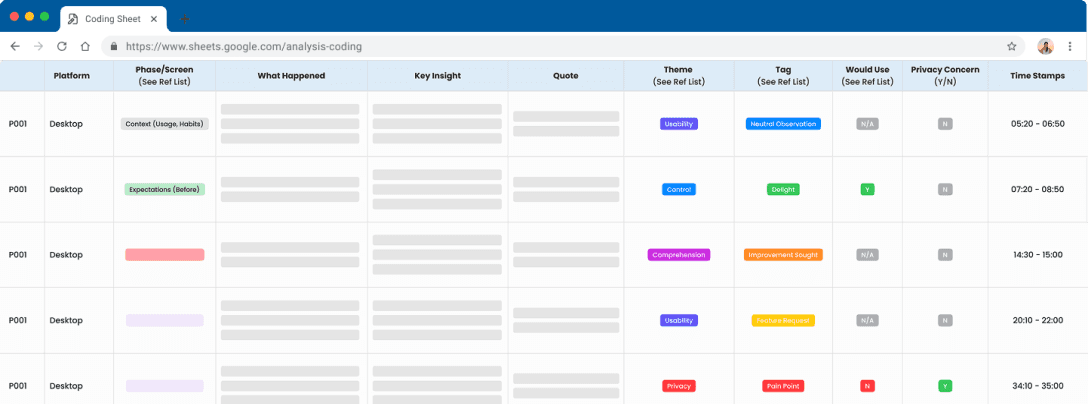
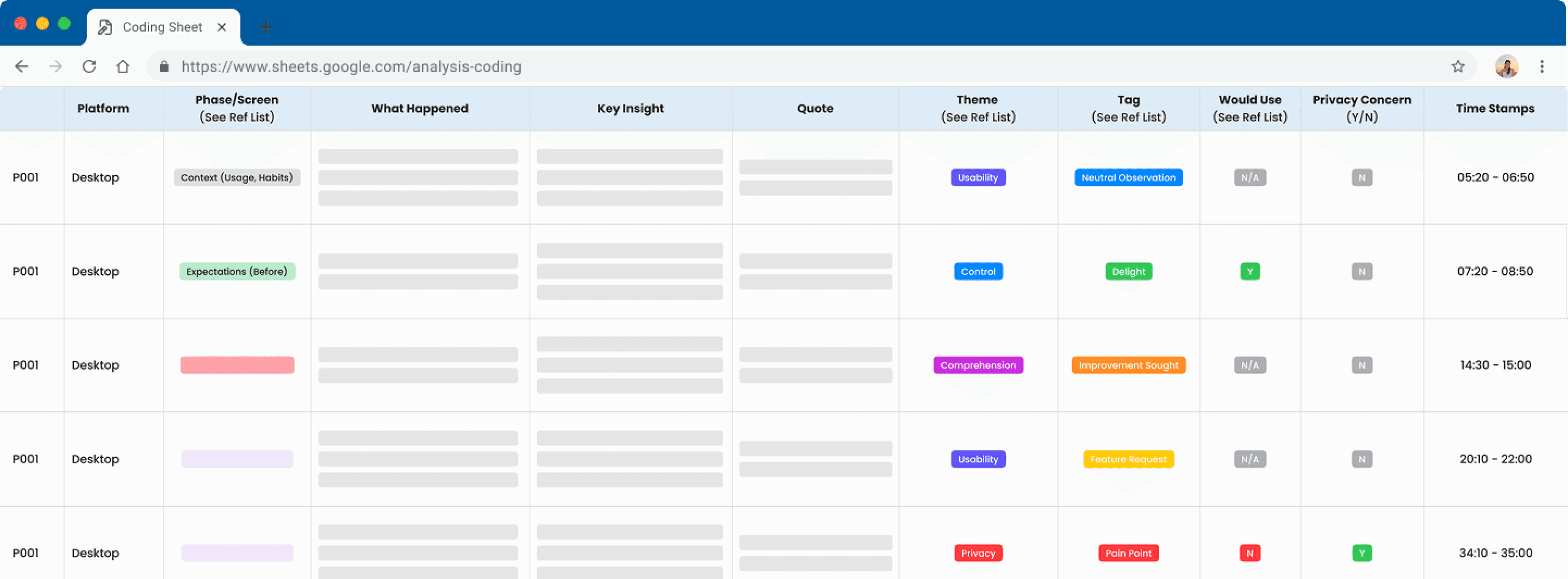
Used a structured coding sheet to tag and synthesize patterns.
Notes & broad insights were taken for daily reviews.
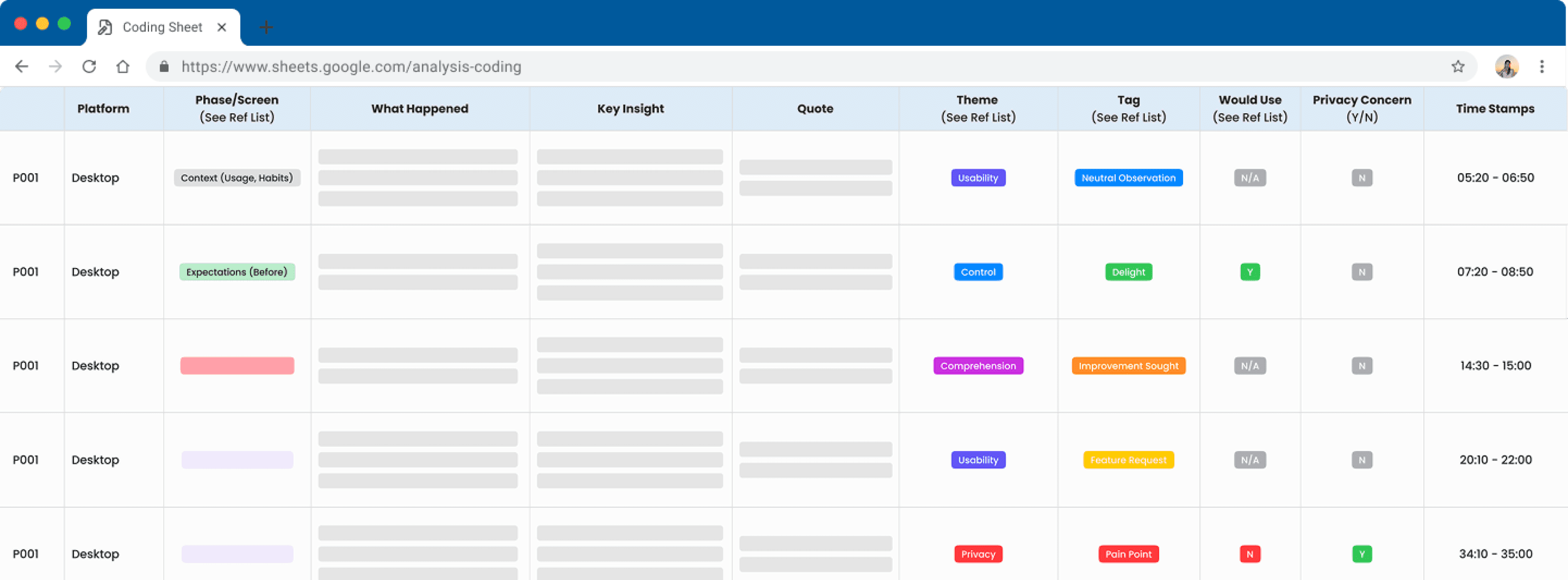
This is a recreation of the sheet we used to track key insights by screens per participant, tagging them and sorting them in the correct categories.
COllaboration
During this process, moderation sessions & post-session debriefs were conducted to ensure stakeholders were engaged throughout the sprint.
01
Live Observation Streams
I helped facilitate private live streaming links for invited stakeholders to watch and provide Q&A feedback in real-time.
02
Daily Insights
Beyond the post-session debriefs, I also delivered 24-hour turnaround highlights and assisted with a mid-sprint topline report.
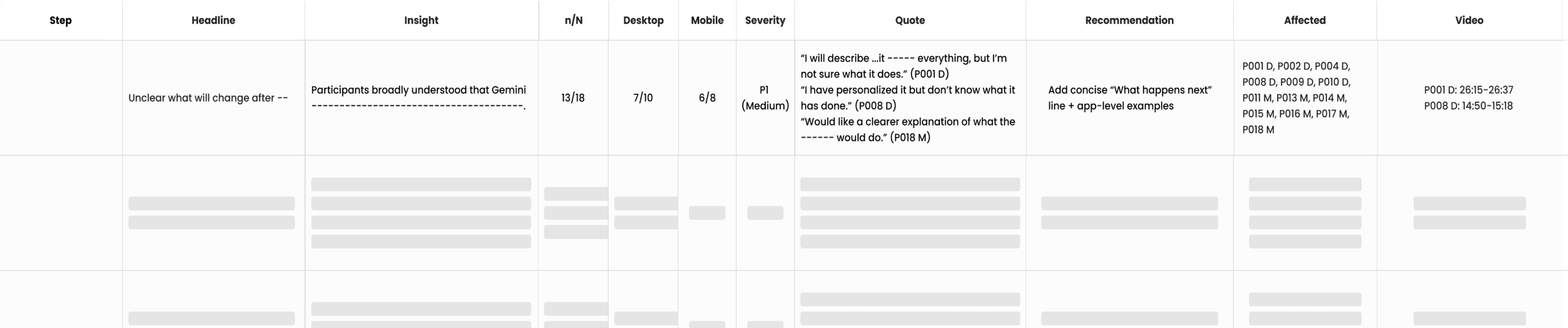
THe Prioritization Framework
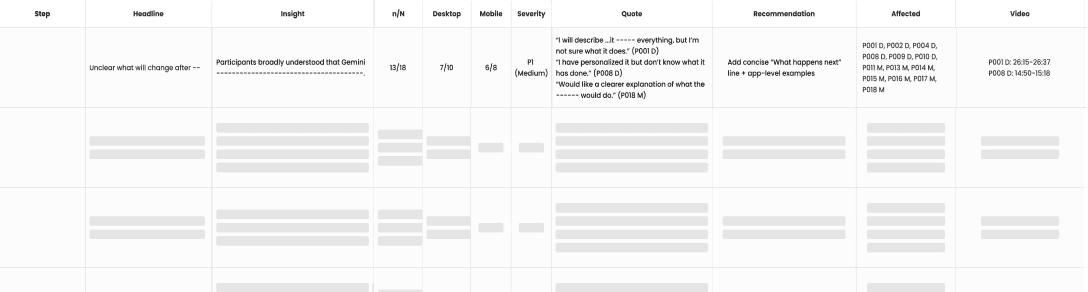
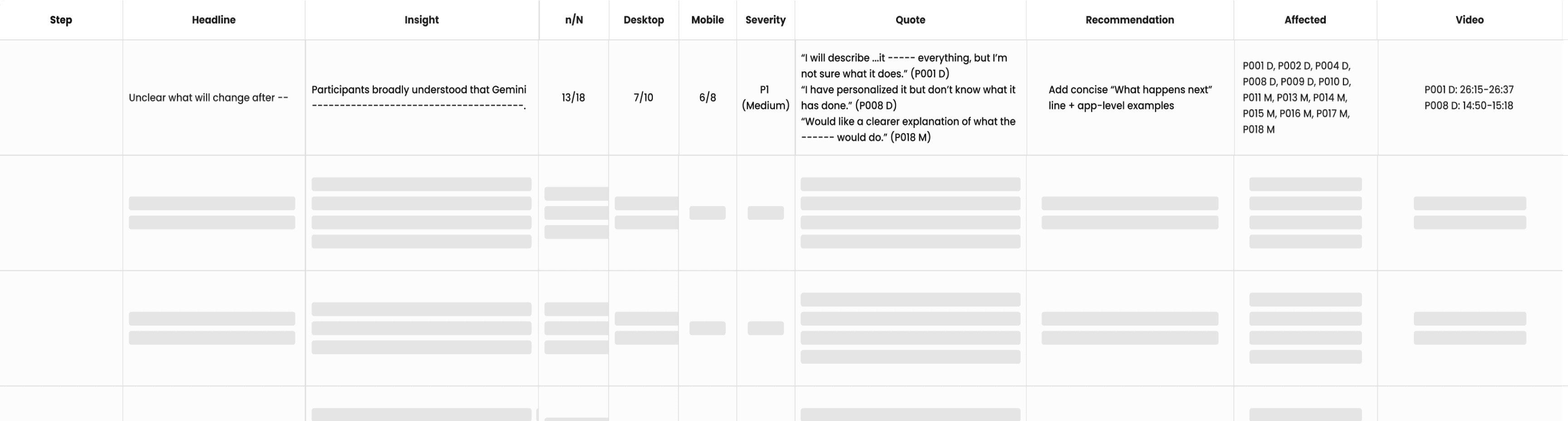
The raw data coded into first user observation sheet was processed again through a detailed overarching system that captured broad overviews. We triaged observations based on a Severity Scale.
RESULTS
Personal Intelligence has since launched to millions of Gemini users globally. Three of our research recommendations were incrementally implemented before launch.
Activation gap
insight 01
Summary
Lack of explicit activation cues left users unsure on what has changed.
Evidence
11/18 participants completed setup flow due to brand trust but were unclear about what the feature would do.
"[To a friend] I’ll describe it as ... it connects everything, but I’m not sure what it does."
PARTICIPANT P1, Desktop
RECOMMENDED ACTIONS
Demonstration & In-depth Explanation
Have ability to see more & review more within the opt-in flow to clarify users understanding.
Instructive Completion Overlay
Adding an orientation screen after opt-in with instructions & examples to help guide users with usage.
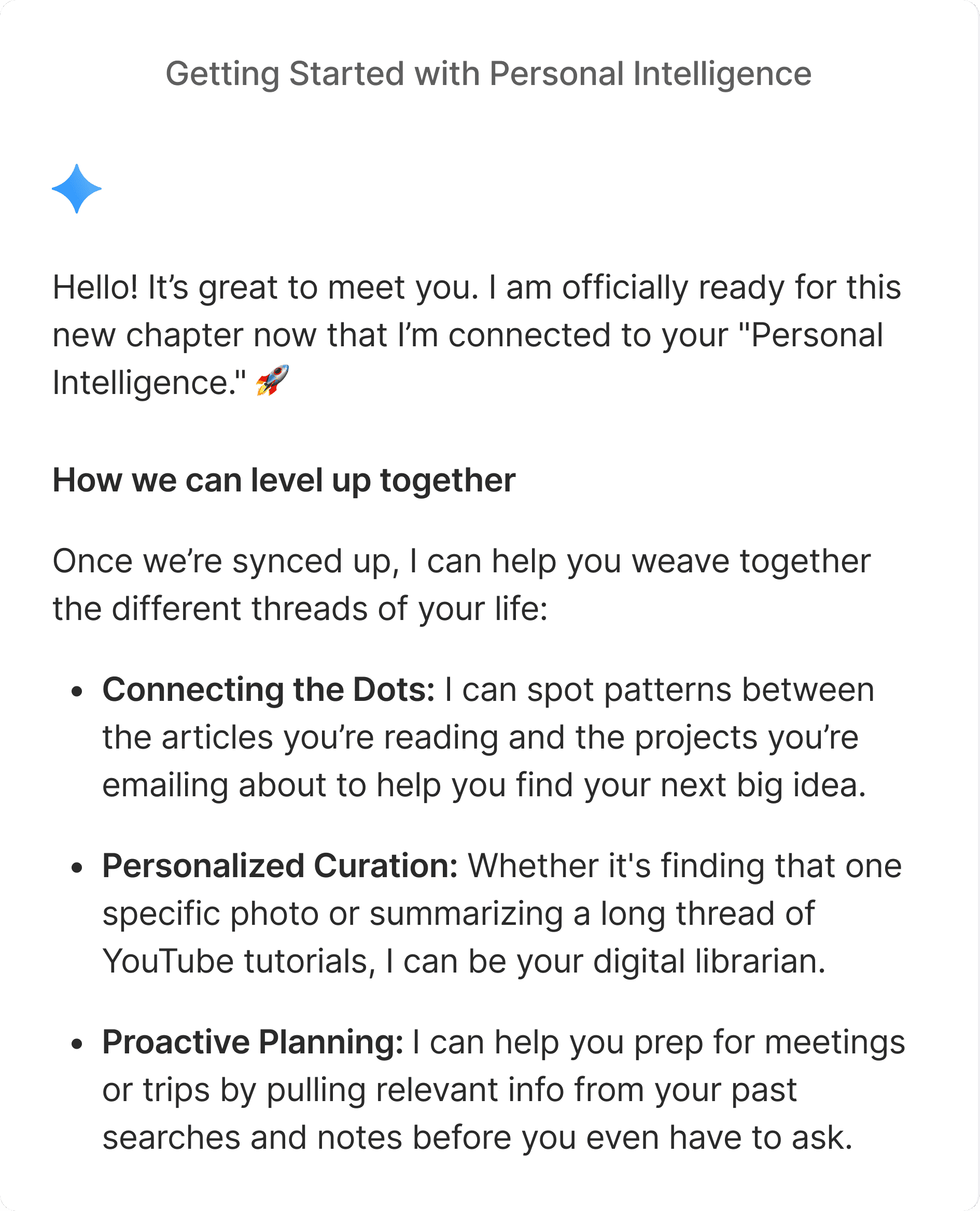
LIVE UI
Contextual Onboarding
A dedicated orientation screen was implemented to guide users through the new aspects of the feature.
Controls & Transparency Gap
insight 02
Summary
Controls were clear once found, but groupings and intrusive phrases lead to hesitation regarding data boundaries.
Evidence
9/18 participants requested more granular control within the feature. A few more reacted negatively to the copy since it felt uncomfortable.
"I didn’t realize Google Workspace would be grouped into one. I was expecting it to be separate."
PARTICIPANT P21, Mobile
RECOMMENDED ACTIONS
Granular Control & Freedom
Break Google Workspace into it’s constituent parts, giving users even more control over their permissions.
Factual & Assistive Tone Adherence
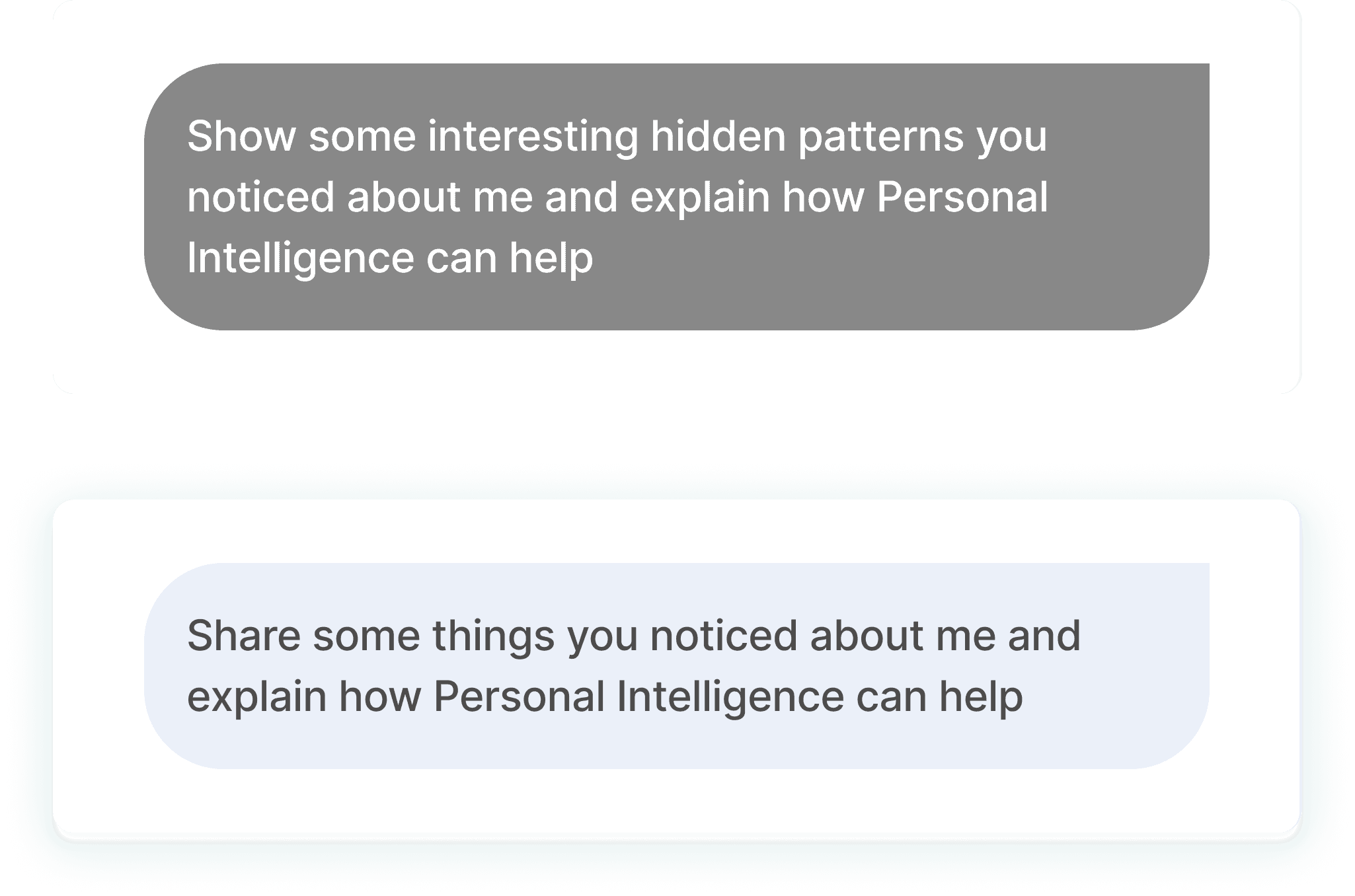
Rewrite descriptive copy to focus less on psychological framing (“ex. analyze you..) and more on assistance (find this..).
LIVE UI
Copy Rewrite
Previously worded "show some interesting hidden patterns", the initial prompt now has a friendlier, non-invasive tone.
Personalization Gap
insight 03
Summary
When the feature works, users are positive. However, the inconsistency & lack of visual attribution prevents users from full satisfaction.
Evidence
9/18 participants couldn’t tell when suggestions were personalized versus generic. Other users ran into generated mistakes, recommended content based on outdated data or tenuous links, lowering trust.
"I don’t see what AI and automation has to do with football and basketball.. it feels like it’s making assumptions that aren’t there."
PARTICIPANT P10, Desktop
RECOMMENDED ACTIONS
Inline Citations
Personalized claims should have clickable citations to allow for verification.
Relevance Adjustment Mechanism
A quick action to provide feedback for mistakes or tweaks to suggestions to retrain the model. (Ex. Thumbs up/down)
LIVE UI
Model Retraining
Users can provide feedback when encountering inaccurate responses or "overpersonalization" with a thumbs/up down mechanism.
IMPACT
3/3
insights translated into shipped UI changes.
Contextual onboarding, copy rewrites, and a model retraining mechanism each landed in the live product before the final deck was delivered.
24hr
turnaround on daily insights for the product team.
Live observation streams, same-day debriefs, and per-participant summaries gave stakeholders structured findings to act on throughout the sprint.
Millions
of Gemini users impacted at launch.
Personal Intelligence is now live with research-backed adjustments to activation, transparency, and trust signals shaping the experience users see.
TAKEAWAYS
During this process, moderation sessions & post-session debriefs were conducted to ensure stakeholders were engaged throughout the sprint.
01
In AI research, "Wizard of Oz" prototyping is critical. We can't just test the UI flow; we have to simulate the personality and latency of the model to get authentic trust signals.
02
To finish a project of this scale within three weeks, it takes detailed communication on a daily basis, future planning and on spot iterations. Several tweaks were made after one session, that were built on every time an error was found or to capture important data. These were communicated after every usability session.
03
Getting analysis done for the final report, it was important to build on it day by day and a detailed coding sheet helped researchers work in tandem. The sheet itself needs to be set up to track insights by categories & tags.
Jaclyn Chin
Back to Work
UX RESEARCH / AI
Gemini AI Personalization Study
Conducting rapid evaluative research to validate core journeys within Gemini's new personalization feature.
ROLE
UX Researcher
TIMELINE
Oct - Nov 2025
TEAM
3 Researchers ~ 1 PM
PLATFORM
Web/IOS/Android
Video asset via Google Blog / Google Design Team
OUTCOME
3/3
insights translated into shipped UI changes.
24hr
turnaround on daily insights for the product team.
Millions
of Gemini users impacted at launch.
Research delivered during a 3-week pre-launch sprint for Gemini's Personal Intelligence feature, now live to millions of users globally.
Designer's Note
This was my first AI-related research sprint with a prestigious company. Coming from government and startup backgrounds, the general structure of moderation and synthesis was familiar, but the required rigor was a masterclass in speed. It was highly iterative and without the drag of waiting for multiple teams’ approval. Observations from one meeting were sent directly to engineering for immediate model testing, and specific user phrases were surfaced to solve problems instantly. If the product team decided something wasn’t working, we iterated the moderator’s guide on the spot. Within three weeks, we evaluated whether users could trust the feature, whether it processed personal information accurately, and whether it walked the fine line between helpful and invasive.
To evaluate successful AI personalization, we built a framework analyzing friction points, trust signals, transparency, and ethical flags. We needed a structure that captured both functional and relational layers, while accounting for how different contexts shifted user reactions. This mattered especially when the model’s language began to breach trust—triggering years of internalized dystopian fear about what AI is for and who it serves. Above all, users needed to feel in complete control of their data and their experience, with the clear ability to step away at any moment.
Triggering years of internalized dystopian fear about what AI is for and who it serves.
Going forward, I realize having a multifaceted user base requires a lot of thought, mapping, and discussion between stakeholders. learned that adaptation is necessary for clean flows. By having different methods of payment that resonate with different life scenarios—a quick flow for those in good standing, a different flow for those on payment plans, and adapted approaches for elderly or ESL users—we can build experiences that actually work for everyone. Holding this holistic view gave me a better picture of how to manage projects with extremely diverse audiences going forward.
Do users understand what the feature is and what value it provides?
Context
I partnered with two researchers to evaluate the new Personal Intelligence feature.
Our tasks included moderating sessions and synthesizing data under strict confidentiality.
01
The Stakes
Rapid end to end usability research (moderation, synthesis, final insight report) must be conducted within a three week period to inform a final launch.
02
Rationale
While previous research showed positive sentiment, no formal usability testing had been conducted. Potential usability issues, user comprehension of features’ controls needed to be identified and formed into actionable insights, helping inform final launch & future states.
Key Questions
4 core questions
The study was framed through these four core questions that targeted value proposition, comprehension, usability and sense of control:
01 Experience & Trust
Do people like it? Why or why not?
02 Usability & Control
What doesn’t work as expected?
03 Comprehension
How would they describe it to a friend?
04 Value Proposition
What causes people to try it (or stop using it)?
METHODS
phase 01
Recruitment
18 active Gemini users within an age range (confidential).
Users also must use 1 core Google service(ex. Gmail, Photos).
Protocol
Moderated usability sessions (60 minutes)
10 Desktop, 8 Mobile conducted via Google Meet.
If a certain element was not accessible, we pivoted to a slide deck of mock-ups.
Analysis
Used a structured coding sheet to tag and synthesize patterns.
Notes & broad insights were taken for daily reviews.
This is a recreation of the sheet we used to track key insights by screens per participant, tagging them and sorting them in the correct categories.
THe Prioritization Framework
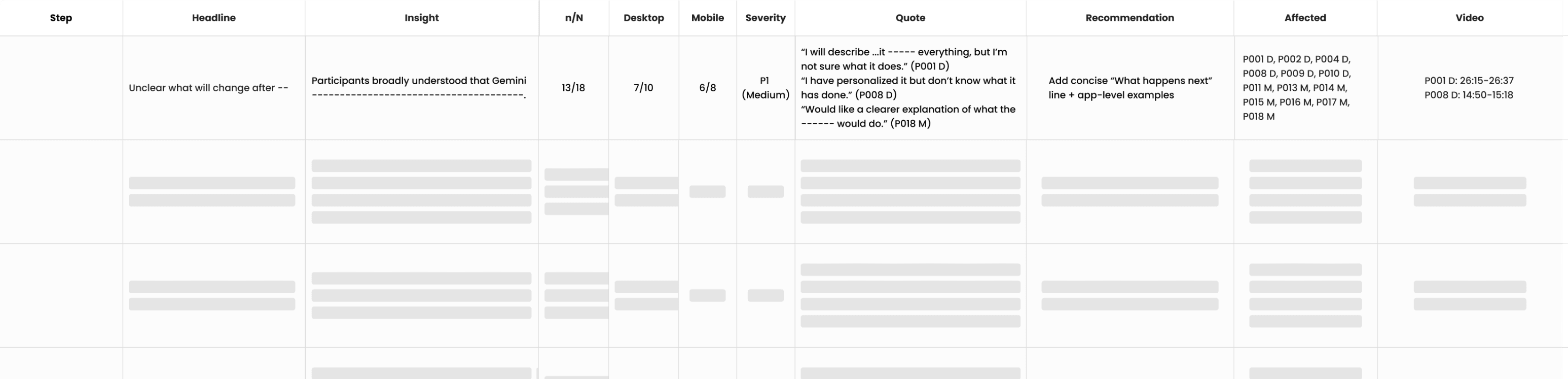
The raw data coded into first user observation sheet was processed again through a detailed overarching system that captured broad overviews. We triaged observations based on a Severity Scale.
COllaboration
During this process, moderation sessions & post-session debriefs were conducted to ensure stakeholders were engaged throughout the sprint.
01
Live Observation Streams
I helped facilitate private live streaming links for invited stakeholders to watch and provide Q&A feedback in real-time.
02
Daily Insights
Beyond the post-session debriefs, I also delivered 24-hour turnaround highlights and assisted with a mid-sprint topline report.
OUTCOME
3/3
insights translated into shipped UI changes.
24hr
turnaround on daily insights for the product team.
Millions
users saved from exiting to Direct Pay.
Research delivered during a 3-week pre-launch sprint for Gemini's Personal Intelligence feature, now live to millions of users globally.
RESULTS
Personal Intelligence has since launched to millions of Gemini users globally. Three of our research recommendations were incrementally implemented before launch.
Activation gap
insight 01
Summary
Lack of explicit activation cues left users unsure on what has changed.
Evidence
11/18 participants completed setup flow due to brand trust but were unclear about what the feature would do.
"[To a friend] I’ll describe it as ... it connects everything, but I’m not sure what it does."
PARTICIPANT P1, Desktop
RECOMMENDED ACTIONS
Demonstration & In-depth Explanation
Have ability to see more & review more within the opt-in flow to clarify users understanding.
Instructive Completion Overlay
Adding an orientation screen after opt-in with instructions & examples to help guide users with usage.
LIVE UI
Contextual Onboarding
A dedicated orientation screen was implemented to guide users through the new aspects of the feature.
Controls & Transparency Gap
insight 02
Summary
Controls were clear once found, but groupings and intrusive phrases lead to hesitation regarding data boundaries.
Evidence
9/18 participants requested more granular control within the feature. A few more reacted negatively to the copy since it felt uncomfortable.
"I didn’t realize Google Workspace would be grouped into one. I was expecting it to be separate."
PARTICIPANT P21, Mobile
RECOMMENDED ACTIONS
Granular Control & Freedom
Break Google Workspace into it’s constituent parts, giving users even more control over their permissions.
Factual & Assistive Tone Adherence
Rewrite descriptive copy to focus less on psychological framing (“ex. analyze you..) and more on assistance (find this..).
LIVE UI
Copy Rewrite
Previously worded "show some interesting hidden patterns", the initial prompt now has a friendlier, non-invasive tone.
Personalization Gap
insight 03
Summary
When the feature works, users are positive. However, the inconsistency & lack of visual attribution prevents users from full satisfaction.
Evidence
9/18 participants couldn’t tell when suggestions were personalized versus generic. Other users ran into generated mistakes, recommended content based on outdated data or tenuous links, lowering trust.
"I don’t see what AI and automation has to do with football and basketball.. it feels like it’s making assumptions that aren’t there."
PARTICIPANT P10, Desktop
RECOMMENDED ACTIONS
Inline Citations
Personalized claims should have clickable citations to allow for verification.
Relevance Adjustment Mechanism
A quick action to provide feedback for mistakes or tweaks to suggestions to retrain the model. (Ex. Thumbs up/down)
LIVE UI
Model Retraining
Users can provide feedback when encountering inaccurate responses or "overpersonalization" with a thumbs/up down mechanism.
IMPACT
3/3
insights translated into shipped UI changes.
Contextual onboarding, copy rewrites, and a model retraining mechanism each landed in the live product before the final deck was delivered.
24hr
turnaround on daily insights for the product team.
Live observation streams, same-day debriefs, and per-participant summaries gave stakeholders structured findings to act on throughout the sprint.
Millions
of Gemini users impacted at launch.
Personal Intelligence is now live with research-backed adjustments to activation, transparency, and trust signals shaping the experience users see.
TAKEAWAYS
During this process, moderation sessions & post-session debriefs were conducted to ensure stakeholders were engaged throughout the sprint.
01
In AI research, "Wizard of Oz" prototyping is critical. We can't just test the UI flow; we have to simulate the personality and latency of the model to get authentic trust signals.
02
To finish a project of this scale within three weeks, it takes detailed communication on a daily basis, future planning and on spot iterations. Several tweaks were made after one session, that were built on every time an error was found or to capture important data. These were communicated after every usability session.
03
Getting analysis done for the final report, it was important to build on it day by day and a detailed coding sheet helped researchers work in tandem. The sheet itself needs to be set up to track insights by categories & tags.
Jaclyn Chin
Back to Work
UX RESEARCH / AI
Gemini AI Personalization Study
Conducting rapid evaluative research to validate core journeys within Gemini's new personalization feature.
ROLE
UX Researcher
TIMELINE
Oct - Nov 2025
TEAM
3 Researchers ~ 1 PM
PLATFORM
Web/IOS/Android
Video asset via Google Blog / Google Design Team
OUTCOME
3/3
insights translated into shipped UI changes.
24hr
turnaround on daily insights for the product team.
Millions
of Gemini users impacted at launch.
Research delivered during a 3-week pre-launch sprint for Gemini's Personal Intelligence feature, now live to millions of users globally.
Designer's Note
This was my first AI-related research sprint with a prestigious company. Coming from government and startup backgrounds, the general structure of moderation and synthesis was familiar, but the required rigor was a masterclass in speed. It was highly iterative and without the drag of waiting for multiple teams’ approval. Observations from one meeting were sent directly to engineering for immediate model testing, and specific user phrases were surfaced to solve problems instantly. If the product team decided something wasn’t working, we iterated the moderator’s guide on the spot. Within three weeks, we evaluated whether users could trust the feature, whether it processed personal information accurately, and whether it walked the fine line between helpful and invasive.
To evaluate successful AI personalization, we built a framework analyzing friction points, trust signals, transparency, and ethical flags. We needed a structure that captured both functional and relational layers, while accounting for how different contexts shifted user reactions. This mattered especially when the model’s language began to breach trust—triggering years of internalized dystopian fear about what AI is for and who it serves. Above all, users needed to feel in complete control of their data and their experience, with the clear ability to step away at any moment.
Triggering years of internalized dystopian fear about what AI is for and who it serves.
Going forward, I realize having a multifaceted user base requires a lot of thought, mapping, and discussion between stakeholders. learned that adaptation is necessary for clean flows. By having different methods of payment that resonate with different life scenarios—a quick flow for those in good standing, a different flow for those on payment plans, and adapted approaches for elderly or ESL users—we can build experiences that actually work for everyone. Holding this holistic view gave me a better picture of how to manage projects with extremely diverse audiences going forward.
Context
I partnered with two researchers to evaluate the new Personal Intelligence feature.
Our tasks included moderating sessions and synthesizing data under strict confidentiality.
01
The Stakes
Rapid end to end usability research (moderation, synthesis, final insight report) must be conducted within a three week period to inform a final launch.
02
Rationale
While previous research showed positive sentiment, no formal usability testing had been conducted. Potential usability issues, user comprehension of features’ controls needed to be identified and formed into actionable insights, helping inform final launch & future states.
Do users understand what the feature is and what value it provides?
Key Questions
4 core questions
The study was framed through these four core questions that targeted value proposition, comprehension, usability and sense of control:
01 Experience & Trust
Do people like it? Why or why not?
02 Usability & Control
What doesn’t work as expected?
03 Comprehension
How would they describe it to a friend?
04 Value Proposition
What causes people to try it (or stop using it)?
METHODS
phase 01
Recruitment
18 active Gemini users within an age range (confidential).
Users also must use 1 core Google service(ex. Gmail, Photos).
Protocol
Moderated usability sessions (60 minutes)
10 Desktop, 8 Mobile conducted via Google Meet.
If a certain element was not accessible, we pivoted to a slide deck of mock-ups.
Analysis
Used a structured coding sheet to tag and synthesize patterns.
Notes & broad insights were taken for daily reviews.
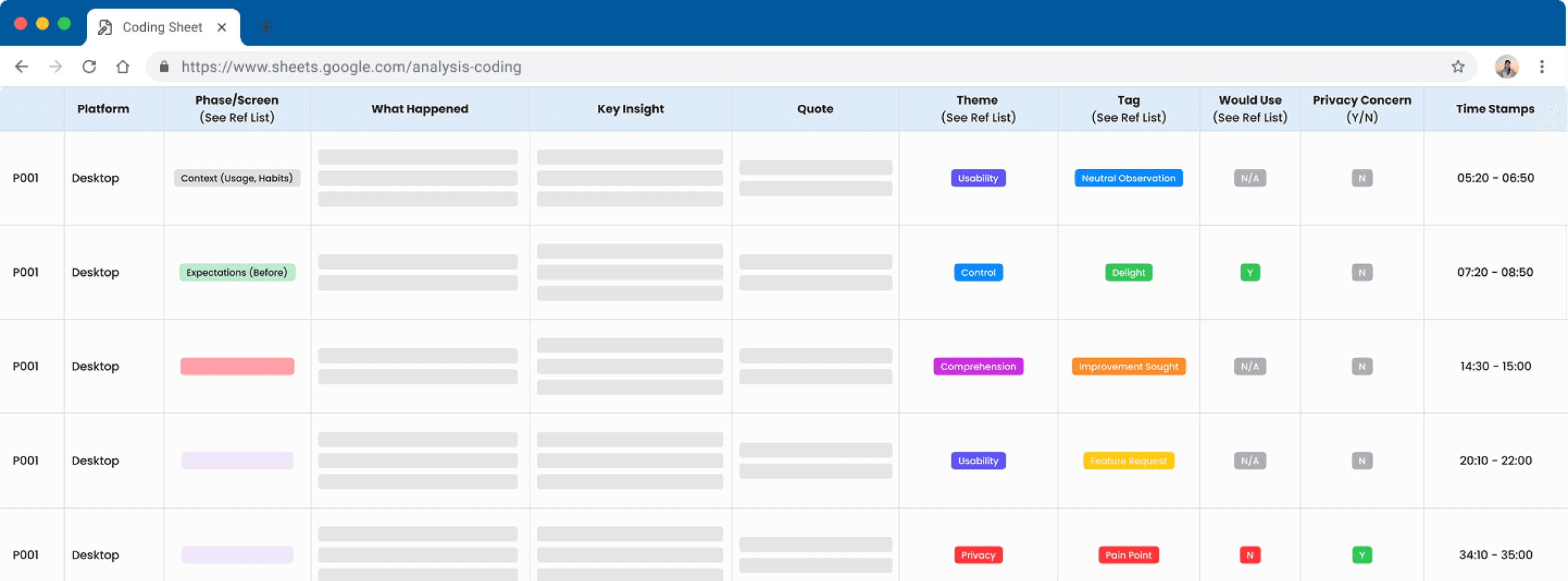
This is a recreation of the sheet we used to track key insights by screens per participant, tagging them and sorting them in the correct categories.
COllaboration
During this process, moderation sessions & post-session debriefs were conducted to ensure stakeholders were engaged throughout the sprint.
01
Live Observation Streams
I helped facilitate private live streaming links for invited stakeholders to watch and provide Q&A feedback in real-time.
02
Daily Insights
Beyond the post-session debriefs, I also delivered 24-hour turnaround highlights and assisted with a mid-sprint topline report.
THe Prioritization Framework
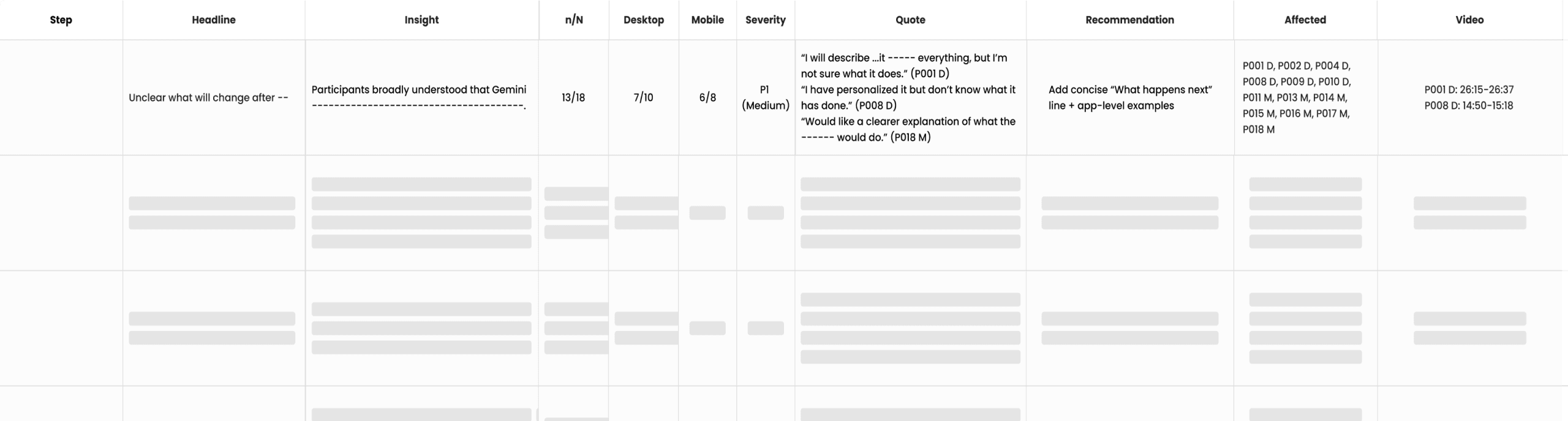
The raw data coded into first user observation sheet was processed again through a detailed overarching system that captured broad overviews. We triaged observations based on a Severity Scale.
RESULTS
Personal Intelligence has since launched to millions of Gemini users globally. Three of our research recommendations were incrementally implemented before launch.
Activation gap
insight 01
Summary
Lack of explicit activation cues left users unsure on what has changed.
Evidence
11/18 participants completed setup flow due to brand trust but were unclear about what the feature would do.
"[To a friend] I’ll describe it as ... it connects everything, but I’m not sure what it does."
PARTICIPANT P1, Desktop
RECOMMENDED ACTIONS
Demonstration & In-depth Explanation
Have ability to see more & review more within the opt-in flow to clarify users understanding.
Instructive Completion Overlay
Adding an orientation screen after opt-in with instructions & examples to help guide users with usage.
LIVE UI
Contextual Onboarding
A dedicated orientation screen was implemented to guide users through the new aspects of the feature.
Controls & Transparency Gap
insight 02
Summary
Controls were clear once found, but groupings and intrusive phrases lead to hesitation regarding data boundaries.
Evidence
9/18 participants requested more granular control within the feature. A few more reacted negatively to the copy since it felt uncomfortable.
"I didn’t realize Google Workspace would be grouped into one. I was expecting it to be separate."
PARTICIPANT P21, Mobile
RECOMMENDED ACTIONS
Granular Control & Freedom
Break Google Workspace into it’s constituent parts, giving users even more control over their permissions.
Factual & Assistive Tone Adherence
Rewrite descriptive copy to focus less on psychological framing (“ex. analyze you..) and more on assistance (find this..).
LIVE UI
Copy Rewrite
Previously worded "show some interesting hidden patterns", the initial prompt now has a friendlier, non-invasive tone.
Personalization Gap
insight 03
Summary
When the feature works, users are positive. However, the inconsistency & lack of visual attribution prevents users from full satisfaction.
Evidence
9/18 participants couldn’t tell when suggestions were personalized versus generic. Other users ran into generated mistakes, recommended content based on outdated data or tenuous links, lowering trust.
"I don’t see what AI and automation has to do with football and basketball.. it feels like it’s making assumptions that aren’t there."
PARTICIPANT P10, Desktop
RECOMMENDED ACTIONS
Inline Citations
Personalized claims should have clickable citations to allow for verification.
Relevance Adjustment Mechanism
A quick action to provide feedback for mistakes or tweaks to suggestions to retrain the model. (Ex. Thumbs up/down)
LIVE UI
Model Retraining
Users can provide feedback when encountering inaccurate responses or "overpersonalization" with a thumbs/up down mechanism.
IMPACT
3/3
insights translated into shipped UI changes.
Contextual onboarding, copy rewrites, and a model retraining mechanism each landed in the live product before the final deck was delivered.
24hr
turnaround on daily insights for the product team.
Live observation streams, same-day debriefs, and per-participant summaries gave stakeholders structured findings to act on throughout the sprint.
Millions
of Gemini users impacted at launch.
Personal Intelligence is now live with research-backed adjustments to activation, transparency, and trust signals shaping the experience users see.
TAKEAWAYS
During this process, moderation sessions & post-session debriefs were conducted to ensure stakeholders were engaged throughout the sprint.
01
In AI research, "Wizard of Oz" prototyping is critical. We can't just test the UI flow; we have to simulate the personality and latency of the model to get authentic trust signals.
02
To finish a project of this scale within three weeks, it takes detailed communication on a daily basis, future planning and on spot iterations. Several tweaks were made after one session, that were built on every time an error was found or to capture important data. These were communicated after every usability session.
03
Getting analysis done for the final report, it was important to build on it day by day and a detailed coding sheet helped researchers work in tandem. The sheet itself needs to be set up to track insights by categories & tags.
MENU
UX DESIGN / PROTOTYPING
Gemini AI Personalization Study
Conducting rapid evaluative research to validate core journeys within Gemini's new personalization feature.
Back to Work
ROLE
Lead UX Designer
TIMELINE
Feb – July 2024
TEAM
3 Researchers
Design Team
PLATFORM
Web ~ Responsive
Video asset via Google Blog / Google Design Team
OUTCOME
3/3
insights translated into shipped UI changes.
24hr
turnaround on daily insights for the product team.
Millions
of Gemini users impacted at launch.
Research delivered during a 3-week pre-launch sprint for Gemini's Personal Intelligence feature, now live to millions of users globally.
Designer's Note
This was my first AI-related research sprint with a prestigious company. Coming from government and startup backgrounds, the general structure of moderation and synthesis was familiar, but the required rigor was a masterclass in speed. It was highly iterative and without the drag of waiting for multiple teams’ approval. Observations from one meeting were sent directly to engineering for immediate model testing, and specific user phrases were surfaced to solve problems instantly. If the product team decided something wasn't working, we iterated the moderator's guide on the spot. Within three weeks, we evaluated whether users could trust the feature, whether it processed personal information accurately, and whether it walked the fine line between helpful and invasive.
Triggering years of internalized dystopian fear about what AI is for and who it serves.
We found that the IRS is seen as a financial institution, yet the mental model that users apply universally to other platforms wasn't reflected in this Make a Payment experience. Bringing all the essential features internally within the flow was the minimum threshold to make it intuitive. I initially tried keeping it similar to the original layout of fill-in blocks, just structured more clearly. However, due to the density of the information and the technical limit of 5 payments per session, a better grouping mechanism had to exist. By employing Gestalt principles, we brought in a dynamic card system with a balance summary, allowing users to easily add and remove payment cards as needed.
Going forward, I realize having a multifaceted user base requires a lot of thought, mapping, and discussion between stakeholders. learned that adaptation is necessary for clean flows. By having different methods of payment that resonate with different life scenarios—a quick flow for those in good standing, a different flow for those on payment plans, and adapted approaches for elderly or ESL users—we can build experiences that actually work for everyone. Holding this holistic view gave me a better picture of how to manage projects with extremely diverse audiences going forward.
CONTINUE READING +
Context
I partnered with two researchers to evaluate the new Personal Intelligence feature.
Our tasks included moderating sessions and synthesizing data under strict confidentiality.
01
The Stakes
Rapid end to end usability research (moderation, synthesis, final insight report) must be conducted within a three week period to inform a final launch.
02
Rationale
While previous research showed positive sentiment, no formal usability testing had been conducted. Potential usability issues, user comprehension of features’ controls needed to be identified and formed into actionable insights, helping inform final launch & future states.
Do users understand what the feature is and what value it provides?
Key Questions
The study was framed through these four core questions that targeted value proposition, comprehension, usability and sense of control:
01 Experience & Trust
Do people like it? Why or why not?
02 Usability & Control
What doesn’t work as expected?
03 Comprehension
How would they describe it to a friend?
04 Value Proposition
What causes people to try it (or stop using it) ?
METHODS
Recruitment
18 active Gemini users within an age range (confidential).
Users also must use 1 core Google service(ex. Gmail, Photos).
Protocol
Moderated usability sessions (60 minutes)
10 Desktop, 8 Mobile conducted via Google Meet.
If a certain element was not accessible, we pivoted to a slide deck of mock-ups.
Analysis
Used a structured coding sheet to tag and synthesize patterns.
Notes & broad insights were taken for daily reviews.
This is a recreation of the sheet we used to track key insights by screens per participant, tagging them and sorting them in the correct categories.
COllaboration
During this process, moderation sessions & post-session debriefs were conducted to ensure stakeholders were engaged throughout the sprint.
01
Live Observation Streams
I helped facilitate private live streaming links for invited stakeholders to watch and provide Q&A feedback in real-time.
02
Daily Insights
Beyond the post-session debriefs, I also delivered 24-hour turnaround highlights and assisted with a mid-sprint topline report.
THe Prioritization Framework
The raw data coded into first user observation sheet was processed again through a detailed overarching system that captured broad overviews. We triaged observations based on a Severity Scale.
RESULTS
Personal Intelligence has since launched to millions of Gemini users globally. Three of our research recommendations were incrementally implemented before launch.
Activation gap
insight 01
Summary
Lack of explicit activation cues left users unsure on what has changed.
Evidence
11/18 participants completed setup flow due to brand trust but were unclear about what the feature would do.
"[To a friend] I’ll describe it as ... it connects everything, but I’m not sure what it does."
PARTICIPANT P1, Desktop
RECOMMENDED ACTIONS
Demonstration & In-depth Explanation
Have ability to see more & review more within the opt-in flow to clarify users understanding.
Instructive Completion Overlay
Adding an orientation screen after opt-in with instructions & examples to help guide users with usage.
LIVE UI
Contextual Onboarding
A dedicated orientation screen was implemented to guide users through the new aspects of the feature.
Controls & Transparency Gap
insight 02
Summary
Controls were clear once found, but groupings and intrusive phrases lead to hesitation regarding data boundaries.
Evidence
9/18 participants requested more granular control within the feature. A few more reacted negatively to the copy since it felt uncomfortable.
"I didn’t realize Google Workspace would be grouped into one. I was expecting it to be separate."
PARTICIPANT P21, Mobile
RECOMMENDED ACTIONS
Granular Control & Freedom
Break Google Workspace into it’s constituent parts, giving users even more control over their permissions.
Factual & Assistive Tone Adherence
Rewrite descriptive copy to focus less on psychological framing (“ex. analyze you..) and more on assistance (find this..).
LIVE UI
Copy Rewrite
Previously worded "show some interesting hidden patterns", the initial prompt now has a friendlier, non-invasive tone.
Personalization Gap
insight 03
Summary
When the feature works, users are positive. However, the inconsistency & lack of visual attribution prevents users from full satisfaction.
Evidence
9/18 participants couldn’t tell when suggestions were personalized versus generic. Other users ran into generated mistakes, recommended content based on outdated data or tenuous links, lowering trust.
"I don’t see what AI and automation has to do with football and basketball.. it feels like it’s making assumptions that aren’t there."
PARTICIPANT P10, Desktop
RECOMMENDED ACTIONS
Inline Citations
Personalized claims should have clickable citations to allow for verification.
Relevance Adjustment Mechanism
A quick action to provide feedback for mistakes or tweaks to suggestions to retrain the model. (Ex. Thumbs up/down)
LIVE UI
Model Retraining
Users can provide feedback when encountering inaccurate responses or "overpersonalization" with a thumbs/up down mechanism.
IMPACT
3/3
insights translated into shipped UI changes.
Contextual onboarding, copy rewrites, and a model retraining mechanism each landed in the live product before the final deck was delivered.
24hr
turnaround on daily insights for the product team.
Live observation streams, same-day debriefs, and per-participant summaries gave stakeholders structured findings to act on throughout the sprint.
Millions
of Gemini users impacted at launch.
Personal Intelligence is now live with research-backed adjustments to activation, transparency, and trust signals shaping the experience users see.
TAKEAWAYS
During this process, moderation sessions & post-session debriefs were conducted to ensure stakeholders were engaged throughout the sprint.
01
In AI research, "Wizard of Oz" prototyping is critical. We can't just test the UI flow; we have to simulate the personality and latency of the model to get authentic trust signals.
02
To finish a project of this scale within three weeks, it takes detailed communication on a daily basis, future planning and on spot iterations. Several tweaks were made after one session, that were built on every time an error was found or to capture important data. These were communicated after every usability session.
03
Getting analysis done for the final report, it was important to build on it day by day and a detailed coding sheet helped researchers work in tandem. The sheet itself needs to be set up to track insights by categories & tags.
Back to Work
UX RESEARCH / AI
Gemini AI Personalization Study
Conducting rapid evaluative research to validate core journeys within Gemini's new personalization feature.
ROLE
UX Researcher
TIMELINE
Oct - Nov 2025
TEAM
3 Researchers ~ 1 PM
PLATFORM
Web/IOS/Android
Video asset via Google Blog / Google Design Team
Do users understand what the feature is and what value it provides?
Context
I partnered with two researchers to evaluate the new Personal Intelligence feature.
Our tasks included moderating sessions and synthesizing data under strict confidentiality.
01
The Stakes
Rapid end to end usability research (moderation, synthesis, final insight report) must be conducted within a three week period to inform a final launch.
02
Rationale
While previous research showed positive sentiment, no formal usability testing had been conducted. Potential usability issues, user comprehension of features’ controls needed to be identified and formed into actionable insights, helping inform final launch & future states.
Designer's Note
This was my first AI-related research sprint with a prestigious company. Coming from government and startup backgrounds, the general structure of moderation and synthesis was familiar, but the required rigor was a masterclass in speed. It was highly iterative and without the drag of waiting for multiple teams’ approval. Observations from one meeting were sent directly to engineering for immediate model testing, and specific user phrases were surfaced to solve problems instantly. If the product team decided something wasn’t working, we iterated the moderator’s guide on the spot. Within three weeks, we evaluated whether users could trust the feature, whether it processed personal information accurately, and whether it walked the fine line between helpful and invasive.
To evaluate successful AI personalization, we built a framework analyzing friction points, trust signals, transparency, and ethical flags. We needed a structure that captured both functional and relational layers, while accounting for how different contexts shifted user reactions. This mattered especially when the model’s language began to breach trust—triggering years of internalized dystopian fear about what AI is for and who it serves. Above all, users needed to feel in complete control of their data and their experience, with the clear ability to step away at any moment.
Triggering years of internalized dystopian fear about what AI is for and who it serves.
Going forward, I realize having a multifaceted user base requires a lot of thought, mapping, and discussion between stakeholders. learned that adaptation is necessary for clean flows. By having different methods of payment that resonate with different life scenarios—a quick flow for those in good standing, a different flow for those on payment plans, and adapted approaches for elderly or ESL users—we can build experiences that actually work for everyone. Holding this holistic view gave me a better picture of how to manage projects with extremely diverse audiences going forward.
Key Questions
4 core questions
The study was framed through these four core questions that targeted value proposition, comprehension, usability and sense of control:
01 Experience & Trust
Do people like it? Why or why not?
02 Usability & Control
What doesn’t work as expected?
03 Comprehension
How would they describe it to a friend?
04 Value Proposition
What causes people to try it (or stop using it)?
METHODS
phase 01
Recruitment
18 active Gemini users within an age range (confidential).
Users also must use 1 core Google service(ex. Gmail, Photos).
Protocol
Moderated usability sessions (60 minutes)
10 Desktop, 8 Mobile conducted via Google Meet.
If a certain element was not accessible, we pivoted to a slide deck of mock-ups.
Analysis
Used a structured coding sheet to tag and synthesize patterns.
Notes & broad insights were taken for daily reviews.
This is a recreation of the sheet we used to track key insights by screens per participant, tagging them and sorting them in the correct categories.
COllaboration
During this process, moderation sessions & post-session debriefs were conducted to ensure stakeholders were engaged throughout the sprint.
01
Live Observation Streams
I helped facilitate private live streaming links for invited stakeholders to watch and provide Q&A feedback in real-time.
02
Daily Insights
Beyond the post-session debriefs, I also delivered 24-hour turnaround highlights and assisted with a mid-sprint topline report.
THe Prioritization Framework
The raw data coded into first user observation sheet was processed again through a detailed overarching system that captured broad overviews. We triaged observations based on a Severity Scale.
RESULTS
Personal Intelligence has since launched to millions of Gemini users globally. Three of our research recommendations were incrementally implemented before launch.
Activation gap
insight 01
Summary
Lack of explicit activation cues left users unsure on what has changed.
Evidence
11/18 participants completed setup flow due to brand trust but were unclear about what the feature would do.
"[To a friend] I’ll describe it as ... it connects everything, but I’m not sure what it does."
PARTICIPANT P1, Desktop
RECOMMENDED ACTIONS
Demonstration & In-depth Explanation
Have ability to see more & review more within the opt-in flow to clarify users understanding.
Instructive Completion Overlay
Adding an orientation screen after opt-in with instructions & examples to help guide users with usage.
LIVE UI
Contextual Onboarding
A dedicated orientation screen was implemented to guide users through the new aspects of the feature.
Controls & Transparency Gap
insight 02
Summary
Controls were clear once found, but groupings and intrusive phrases lead to hesitation regarding data boundaries.
Evidence
9/18 participants requested more granular control within the feature. A few more reacted negatively to the copy since it felt uncomfortable.
"I didn’t realize Google Workspace would be grouped into one. I was expecting it to be separate."
PARTICIPANT P21, Mobile
RECOMMENDED ACTIONS
Granular Control & Freedom
Break Google Workspace into it’s constituent parts, giving users even more control over their permissions.
Factual & Assistive Tone Adherence
Rewrite descriptive copy to focus less on psychological framing (“ex. analyze you..) and more on assistance (find this..).
LIVE UI
Copy Rewrite
Previously worded "show some interesting hidden patterns", the initial prompt now has a friendlier, non-invasive tone.
Personalization Gap
insight 03
Summary
When the feature works, users are positive. However, the inconsistency & lack of visual attribution prevents users from full satisfaction.
Evidence
9/18 participants couldn’t tell when suggestions were personalized versus generic. Other users ran into generated mistakes, recommended content based on outdated data or tenuous links, lowering trust.
"I don’t see what AI and automation has to do with football and basketball.. it feels like it’s making assumptions that aren’t there."
PARTICIPANT P10, Desktop
RECOMMENDED ACTIONS
Inline Citations
Personalized claims should have clickable citations to allow for verification.
Relevance Adjustment Mechanism
A quick action to provide feedback for mistakes or tweaks to suggestions to retrain the model. (Ex. Thumbs up/down)
LIVE UI
Model Retraining
Users can provide feedback when encountering inaccurate responses or "overpersonalization" with a thumbs/up down mechanism.
IMPACT
3/3
insights translated into shipped UI changes.
Contextual onboarding, copy rewrites, and a model retraining mechanism each landed in the live product before the final deck was delivered.
24hr
turnaround on daily insights for the product team.
Live observation streams, same-day debriefs, and per-participant summaries gave stakeholders structured findings to act on throughout the sprint.
Millions
of Gemini users impacted at launch.
Personal Intelligence is now live with research-backed adjustments to activation, transparency, and trust signals shaping the experience users see.
TAKEAWAYS
During this process, moderation sessions & post-session debriefs were conducted to ensure stakeholders were engaged throughout the sprint.
01
In AI research, "Wizard of Oz" prototyping is critical. We can't just test the UI flow; we have to simulate the personality and latency of the model to get authentic trust signals.
02
To finish a project of this scale within three weeks, it takes detailed communication on a daily basis, future planning and on spot iterations. Several tweaks were made after one session, that were built on every time an error was found or to capture important data. These were communicated after every usability session.
03
Getting analysis done for the final report, it was important to build on it day by day and a detailed coding sheet helped researchers work in tandem. The sheet itself needs to be set up to track insights by categories & tags.
OUTCOME
3/3
insights translated into shipped UI changes.
24hr
turnaround on daily insights for the product team.
Millions
of Gemini users impacted at launch.
Research delivered during a 3-week pre-launch sprint for Gemini's Personal Intelligence feature, now live to millions of users globally.
Jaclyn Chin